Module 10 - River Diversity Exercise

See Corresponding Learning Module
Go to the learning module for this topic.
In this assignment, you will explore river diversity in a variety of ways.
Part 1 - River Diversity Globally
Instructions
Submit at least six Google Earth URLs (links to an external site.) of Riverscapes you have never been to in person at camera zoom levels between 2 km and 15 km appropriate to the riverscape segment you are showing (you will share and submit these during class), which collectively satisfy the following criterions:
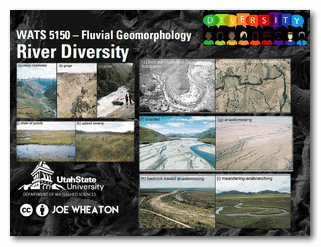
- At least one riverscape from Asia, Africa, South America, Europe, North America
- At least one confined riverscape
- At least one margin-controlled riverscape (i.e., partly-confined)
- At least one planform-controlled riverscape (i.e., partly-confined)
- At least one laterally unconfined riverscape
- At least one riverscape without any active channels
- At least one riverscape with multiple channel threads
- At least one riverscape with very high sinuosity channel(s)
Please submit at least six riverscapes (feel free to submit more) using this form. We will be filling out this form together in class and working through responses for identifying and defining different flavors of rivers.
Submit Riverscape Map Now
Multiple submissions encouraged.
Part 2 - River Diversity Regionally
River classification frameworks (e.g., the River Styles Framework by our book authors) seek to categorize rivers into distinct types based on their form and function, informed by some set of controlling factors/variables. The Riverscape Metric Engine is a network model that aggregates a variety of riverscape metrics (e.g., slope, valley confinement, sinuosity, etc.) at the riverscape reach/segment scale across entire riverscape networks. The outputs, therefore, provide a wealth of information that can be used to explore riverscape diversity across a region. For this assignment, you will generate a Riverscape Metric project for a region of your choice in the United States and perform a reach classification, then use that classification to identify similar riverscapes within that region.
Instructions
- Use the "IGO Scraper" to generate an Metric Engine project for a large region (e.g., a whole state, HUC4 watershed, or custom area of equivalent size).
- Open the generated project using the Riverscapes Viewer in QGIS. Use a selection of the available riverscape metrics to come up with a classification of four different river styles.
- Reclassify the IGO points in the feature class of your project based on the metric criteria you came up with. This will assign points to your four river styles and allow you to find all other riverscapes in the project extent that fall into these river styles.
- Report on the river styles you came up with and the length of riverscape in each class within your project extent as well as the proportion of total riverscape that each class makes up.
Part III - River Diversity by Name
Use the same large project extent to Generate a word cloud of river names within the same area you chose for Part 2. Report on which names are most common in your project extent.
Relevant Papers
Brierley & Fryirs (2005) River Styles Framework
The River Styles Framework is laid out in Part 2 of the Brierley and Fryirs (2005) book and is the conceptual basis for much of our book. For an overview lecture of the framework, see this Module in WATS 6860 Ecohydraulics.
- Brierley, G., and K. Fryirs 2005. Geomorphology and River Management: Applications of the River Styles Framework. Blackwell Publishing, Victoria, Australia.
